
AetherDoors is Aetherra’s custom door claiming, locking, knocking, and doorbell system. It replaces the old DoorsReloaded setup with a more immersive home access system.
Basic Command
Use:
/ad helpThe full command also works:
/aetherdoors helpClaiming a Door
Look directly at the door you want to claim and run:
/ad claim <name>Example:
/ad claim Mystik's Home
This claims the door and gives it a name. The name can be used for homes, taverns, shops, guild halls, or other buildings.
By default, claimed doors are locked when claimed.
Viewing Door Info
Look at a claimed door and run:
/ad infoThis shows the door name, owner, lock status, trusted player count, and linked controls.
Renaming a Door
Look at your claimed door and run:
/ad rename <new name>Example:
/ad rename Ikon's Tavern
If the door has a plaque, the plaque should update automatically.
Locking and Unlocking
Look at your claimed door and run:
/ad lockor:
/ad unlockLocked doors can only be opened by the owner, trusted players, or staff using active bypass mode.
Trusting Players
To allow someone else to enter your locked door, look at the door and run:
/ad trust <player>To remove their access:
/ad untrust <player>To view who is trusted:
/ad trustedTrusted players can enter locked doors, but they cannot manage the lock, remove the claim, or control linked lock buttons.
Removing a Door Claim
Look at your claimed door and run:
/ad removeAfter removing the claim, the door behaves like a normal Minecraft door again.
Hearth Key
Players can create a Hearth Key by renaming a tripwire hook to:
Hearth KeyRight-click your claimed door while holding the Hearth Key to open a control-linking menu.
The Hearth Key can link or unlink:
- Lock buttons
- Button doorbells
- Bell doorbells
- Door plaques
This is an easier alternative to using the /ad link... commands.
Lock Buttons
You can link a button to your claimed door as a lock/unlock switch.
Run:
/ad linkbuttonThen click your claimed door, then click the button.
Only the owner can use the linked lock button. Trusted players can enter the door, but they cannot toggle the lock.
Lock buttons are recommended to be placed inside of your building.
To unlink it:
/ad unlinkbuttonDoor Plaques
A door plaque is a linked sign that displays the door/building name and whether it is locked or unlocked.
Run:
/ad linkplaqueThen click your claimed door, then click the sign.
The plaque will update when the door is locked, unlocked, or renamed.
To unlink it:
/ad unlinkplaqueTo refresh it manually:
/ad plaqueKnocking
Left-click a claimed door to knock.
If the owner is online, they will receive an alert.
If the owner is offline, they will receive a missed notice when they log in.
Sneak while knocking to knock anonymously. The owner will see that someone knocked, but not who.
Doorbells
A claimed door can have a linked doorbell. There are two doorbell options:
- Bell doorbell
- Button doorbell
To link a bell:
/ad linkbellThen click your claimed door, then click the bell.
To unlink a bell:
/ad unlinkbellTo link a button as a doorbell:
/ad linkdoorbellbuttonThen click your claimed door, then click the button.
To unlink a button doorbell:
/ad unlinkdoorbellbuttonSneak while ringing a doorbell to ring anonymously.
Alarm Bell Recipe
Players can craft an Alarm Bell.
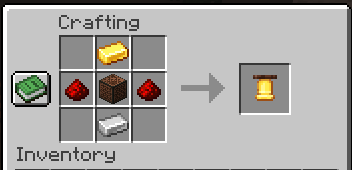
Recipe:
[empty] Gold Ingot [empty]Redstone Note Block Redstone[empty] Iron Ingot [empty]
The crafted Alarm Bell can be placed and linked as a doorbell.
Missed Notices
To view missed knocks and doorbell rings:
/ad noticesTo clear them:
/ad clearnoticesIf the server is set to clear notices after login, notices may disappear after they are shown.
House Ledger
Use an anvil to rename a book to:
House LedgerThen right-click your claimed door while holding it.
The House Ledger opens a door management menu where you can:
- Lock or unlock the door
- View door info
- Refresh the plaque
- View notices
- Trust nearby players
- Remove trusted players
Double Doors
AetherDoors supports double doors. If you claim one side of a proper double door, the matching partner door should open, close, and protect with it.
Important Notes
A claimed door and its linked controls cannot be broken normally. If you want to remove a claimed door, use:
/ad removeIf you want to remove a linked button, bell, or plaque, unlink it first.
This helps prevent broken door data and ghost claims.